
Lỗi khi cài việt hóa
em tải nioh không chạy setup việt hóa vô thì chơi được, lúc cài xong việt hóa thì ra lỗi này.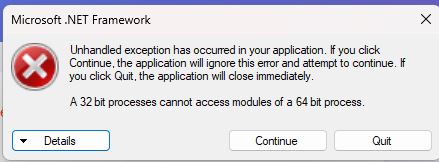
See the end of this message for details on invoking
just-in-time (JIT) debugging instead of this dialog box.
************** Exception Text **************
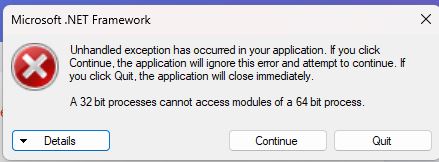
System.ComponentModel.Win32Exception (0x80004005): A 32 bit processes cannot access modules of a 64 bit process.
at System.Diagnostics.NtProcessManager.GetModuleInfos(Int32 processId, Boolean firstModuleOnly)
at System.Diagnostics.NtProcessManager.GetFirstModuleInfo(Int32 processId)
at System.Diagnostics.Process.get_MainModule()
at LinkNeverDie.Com_Lib.SW.SteamRegRestore()
at LND_Game_Launcher.Form1.Form1_Load(Object sender, EventArgs e)
at System.EventHandler.Invoke(Object sender, EventArgs e)
at System.Windows.Forms.Form.OnLoad(EventArgs e)
at System.Windows.Forms.Form.OnCreateControl()
at System.Windows.Forms.Control.CreateControl(Boolean fIgnoreVisible)
at System.Windows.Forms.Control.CreateControl()
at System.Windows.Forms.Control.WmShowWindow(Message& m)
at System.Windows.Forms.Control.WndProc(Message& m)
at System.Windows.Forms.ScrollableControl.WndProc(Message& m)
at System.Windows.Forms.Form.WmShowWindow(Message& m)
at System.Windows.Forms.Form.WndProc(Message& m)
at System.Windows.Forms.Control.ControlNativeWindow.OnMessage(Message& m)
at System.Windows.Forms.Control.ControlNativeWindow.WndProc(Message& m)
at System.Windows.Forms.NativeWindow.Callback(IntPtr hWnd, Int32 msg, IntPtr wparam, IntPtr lparam)
************** Loaded Assemblies **************
mscorlib
Assembly Version: 4.0.0.0
Win32 Version: 4.8.9221.0 built by: NET481REL1LAST_25H2
CodeBase: file:///C:/Windows/Microsoft.NET/Framework/v4.0.30319/mscorlib.dll
----------------------------------------
LND Game Launcher
Assembly Version: 1.0.0.0
Win32 Version: 1.0.0.0
CodeBase: file:///D:/Games/Nioh.2_LinkNeverDie.Com/_Nioh%202%20-%20LND%20Game%20Launcher.exe
----------------------------------------
Microsoft.VisualBasic
Assembly Version: 10.0.0.0
Win32 Version: 14.8.9221.0 built by: NET481REL1LAST_25H2
CodeBase: file:///C:/WINDOWS/Microsoft.Net/assembly/GAC_MSIL/Microsoft.VisualBasic/v4.0_10.0.0.0__b03f5f7f11d50a3a/Microsoft.VisualBasic.dll
----------------------------------------
System.Windows.Forms
Assembly Version: 4.0.0.0
Win32 Version: 4.8.9221.0 built by: NET481REL1LAST_25H2
CodeBase: file:///C:/WINDOWS/Microsoft.Net/assembly/GAC_MSIL/System.Windows.Forms/v4.0_4.0.0.0__b77a5c561934e089/System.Windows.Forms.dll
----------------------------------------
System
Assembly Version: 4.0.0.0
Win32 Version: 4.8.9321.0 built by: NET481REL1LAST_25H2_B
CodeBase: file:///C:/WINDOWS/Microsoft.Net/assembly/GAC_MSIL/System/v4.0_4.0.0.0__b77a5c561934e089/System.dll
----------------------------------------
System.Drawing
Assembly Version: 4.0.0.0
Win32 Version: 4.8.9221.0 built by: NET481REL1LAST_25H2
CodeBase: file:///C:/WINDOWS/Microsoft.Net/assembly/GAC_MSIL/System.Drawing/v4.0_4.0.0.0__b03f5f7f11d50a3a/System.Drawing.dll
----------------------------------------
System.Configuration
Assembly Version: 4.0.0.0
Win32 Version: 4.8.9221.0 built by: NET481REL1LAST_25H2
CodeBase: file:///C:/WINDOWS/Microsoft.Net/assembly/GAC_MSIL/System.Configuration/v4.0_4.0.0.0__b03f5f7f11d50a3a/System.Configuration.dll
----------------------------------------
System.Core
Assembly Version: 4.0.0.0
Win32 Version: 4.8.9319.0 built by: NET481REL1LAST_25H2_B
CodeBase: file:///C:/WINDOWS/Microsoft.Net/assembly/GAC_MSIL/System.Core/v4.0_4.0.0.0__b77a5c561934e089/System.Core.dll
----------------------------------------
System.Xml
Assembly Version: 4.0.0.0
Win32 Version: 4.8.9221.0 built by: NET481REL1LAST_25H2
CodeBase: file:///C:/WINDOWS/Microsoft.Net/assembly/GAC_MSIL/System.Xml/v4.0_4.0.0.0__b77a5c561934e089/System.Xml.dll
----------------------------------------
System.Runtime.Remoting
Assembly Version: 4.0.0.0
Win32 Version: 4.8.9221.0 built by: NET481REL1LAST_25H2
CodeBase: file:///C:/WINDOWS/Microsoft.Net/assembly/GAC_MSIL/System.Runtime.Remoting/v4.0_4.0.0.0__b77a5c561934e089/System.Runtime.Remoting.dll
----------------------------------------
LinkNeverDie.Com_Lib
Assembly Version: 1.0.0.0
Win32 Version: 1.0.0.0
CodeBase: file:///D:/Games/Nioh.2_LinkNeverDie.Com/LinkNeverDie.Com_Lib.DLL
----------------------------------------
xfMBlpMfEsqHBrRbGdmISOtJzAww
Assembly Version: 0.0.0.0
Win32 Version: 1.0.0.0
CodeBase: file:///D:/Games/Nioh.2_LinkNeverDie.Com/LinkNeverDie.Com_Lib.dll
----------------------------------------
************** JIT Debugging **************
To enable just-in-time (JIT) debugging, the .config file for this
application or computer (machine.config) must have the
jitDebugging value set in the system.windows.forms section.
The application must also be compiled with debugging
enabled.
For example:
<configuration>
<system.windows.forms jitDebugging="true" />
</configuration>
When JIT debugging is enabled, any unhandled exception
will be sent to the JIT debugger registered on the computer
rather than be handled by this dialog box.
Các bài viết liên quan:
-
Không hiện tiếng việt dù đã cài việt hóa
-
Fears to Fathom - Scratch Creek v3538192 cài Việt Hóa bị văng
-
Hướng dẫn việt hóa cho RE9
-
Lỗi khi Việt Hóa Resident Evil 5
-
lỗi việt hóa eldenring
-
Lỗi cài việt hóa Resident Evil Requiem
-
Medieval Dynasty Lỗi MOd game việt hóa
-
Lỗi Việt Hóa Resident Evil 5
-
Vấn đề về Việt Hóa
-
Game Broken Arrow bị tự động out khi cài bản việt hóa.
- Xem thêm nhiều bài hơn

-

Đọc thông báo hòm thư nhé
-
@Toi Da Trang oke e check rồi sếp
-
1410
2